AI / ML · Shipped 2026
StackWise
A planner that teaches people building apps with AI what every part of their stack does. A rules engine checks each connection against sourced facts, and coding agents get the plan over MCP.
- Year
- 2026
- Role
- Solo build
- Stack
- TypeScript, Next.js 16, React Flow, MCP, Claude API, Vitest
Why I built it
More people than ever are building real apps with Lovable, Bolt, Replit and Claude Code without ever having chosen a stack. The AI writes the code, but the decisions underneath it are still theirs: which host, which database, which login provider, how payments and email plug in. Every provider has its own limits, prices and setup steps, and the generated code quietly wires in keys, webhooks and settings the person has never seen.
The mistakes show up late. The data disappears on the first redeploy. A secret key is readable in the browser. The free plan runs out the week the app gets used. A payment arrives and nothing handles it. By then the code depends on the choice, and fixing it means rewriting.
What is missing is not more code generation. It is understanding, at the moment the decision is made. StackWise is a planner for that moment: you lay out the app before the code exists, and you come away knowing what every part does, what it costs, how it connects, and why it was picked.
See it running
What it does
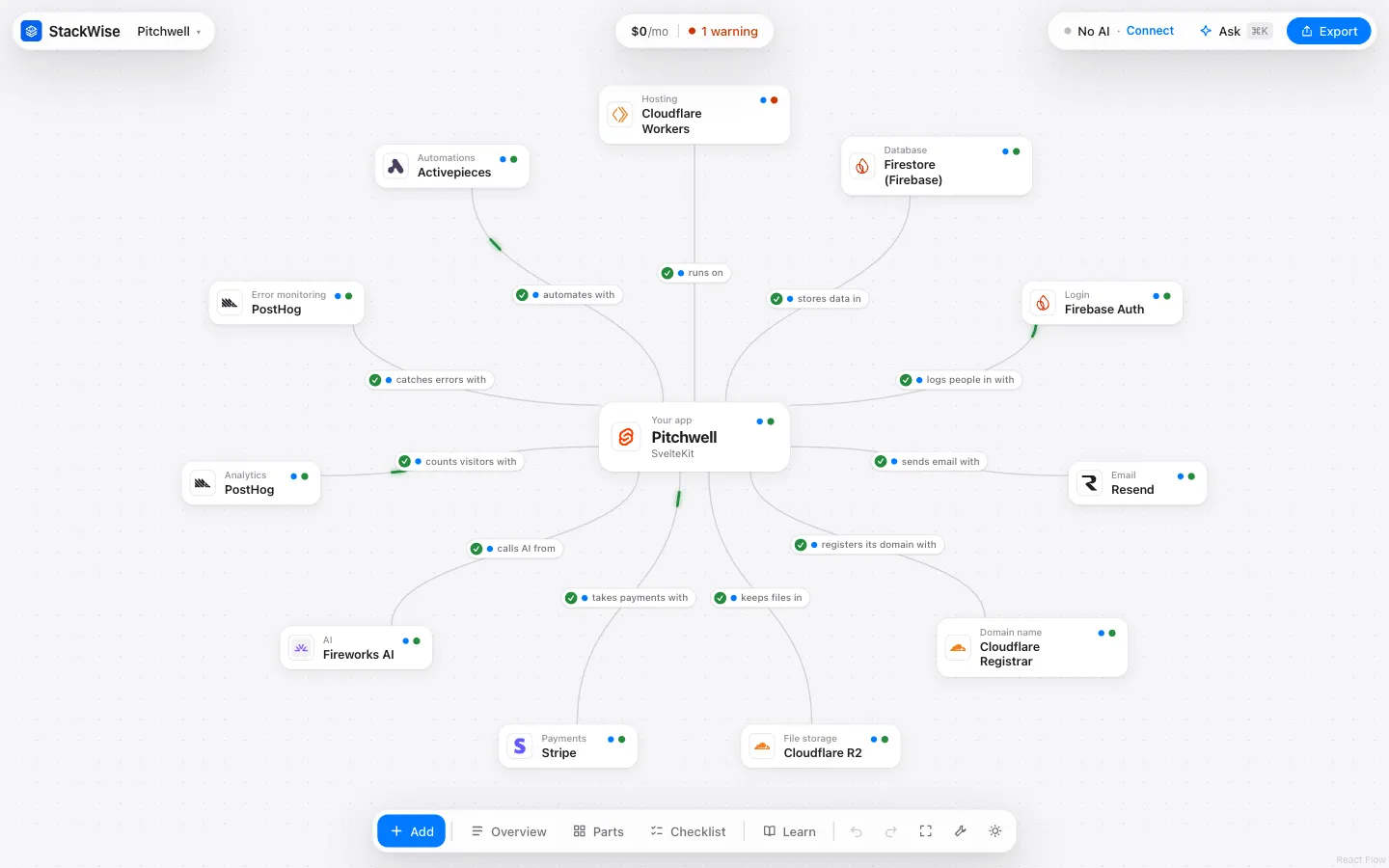
You describe the app you want in a paragraph. StackWise works out what it needs (accounts, payments, uploads, email, background jobs, a domain), shows you the exact words behind every guess, and asks you to confirm each one. Then it fills a canvas with a service for every part: a host, a database, login, payments, email and so on, up to sixteen parts, chosen from 101 services.
Every line on that canvas is a verdict: a check means the two work together, a warning means they do with a catch, a cross means they don’t. Click one and you get the reason, the fix and the source page it came from. When the plan looks right, StackWise hands it to whatever is building the app: a spec pack for Lovable or Bolt, or, for a coding agent like Claude Code, a live connection over the Model Context Protocol.
Built to teach, not just to answer
One principle runs through the whole interface: nothing is decided silently. Every choice on screen comes with its reason, in plain words, with a source you can open. The goal is that someone on their first app finishes the plan understanding it well enough to change it.
- Guesses you confirm. Reading your description, StackWise shows the words each guess came from (“you wrote ‘pay’, so: yes”), and only asks the questions that would actually change the plan.
- Every part explained. A Learn page covers all sixteen parts of an app: what each one is, why an app needs it, how to choose, and where beginners slip. It opens with how a web app fits together (browser, server, database, outside services, environment variables) and ends with a glossary of fifty terms. Right-click any card to jump to its section.
- Providers side by side. Each service shows what matters at your size: what it costs now, the first paid plan, how far the free plan goes, and the one trait that matters for its part, like a domain’s renewal price, whether a free host falls asleep, download fees for storage, or who handles sales tax for payments. Pick two or three to compare stat by stat, each with its source.
- Costs before they happen. The cost of the whole plan at four audience sizes, one line per part, so you watch a free plan run out on screen instead of on a bill.
- A priority for learning. Besides “spend $0”, “launch fast” and “ready to grow”, you can plan to learn how it works, which weighs how easily you could move off a tool above its price or setup time, so a first project doesn’t lock you into something you don’t understand yet.
- Ask about anything. Setup steps, which keys a service needs, what could go wrong, what else would work. The answer comes from StackWise’s facts, or from Claude explaining those same facts when a key is set.
Seeing what your code is setting up
The line between your app and a service is where beginners lose the thread: the code works, and nobody can say what it is actually doing. So the lines are clickable. Each one shows what travels along it: every environment variable your code reads to reach that service, which setup step gives you its value, and whether the browser can read it.
That last part matters more than it looks. A variable named NEXT_PUBLIC_… (or VITE_…,
or PUBLIC_…, depending on the framework) is shipped to every visitor, so it can never
hold a secret, and StackWise marks it public so nobody learns that the hard way. The names
follow your framework’s conventions, and the line to your host carries every variable in
the plan, because the host needs them all.
The checklist turns the same information into an order of work: create each account, get
each key, put it where it goes, with one docs link per service. The export adds an
.env.example grouped by service and a .gitignore that keeps the real values out of
git. The plan only ever holds names; the values stay in your own .env.local.
The part I would defend in an interview
The AI never decides whether two services work together. Rules do, from facts.
The obvious version of this product is a chatbot that recommends a stack, and it has no way to show its work. Whether SQLite works on Netlify depends on one fact about the host (does your app get a disk that survives a deploy?) and one fact about the database (does it keep data in a file on that disk?). So those are what StackWise stores: 557 facts about 101 services, each with a source URL, the date it was read and a status, and 51 rules that each read at most two parts.
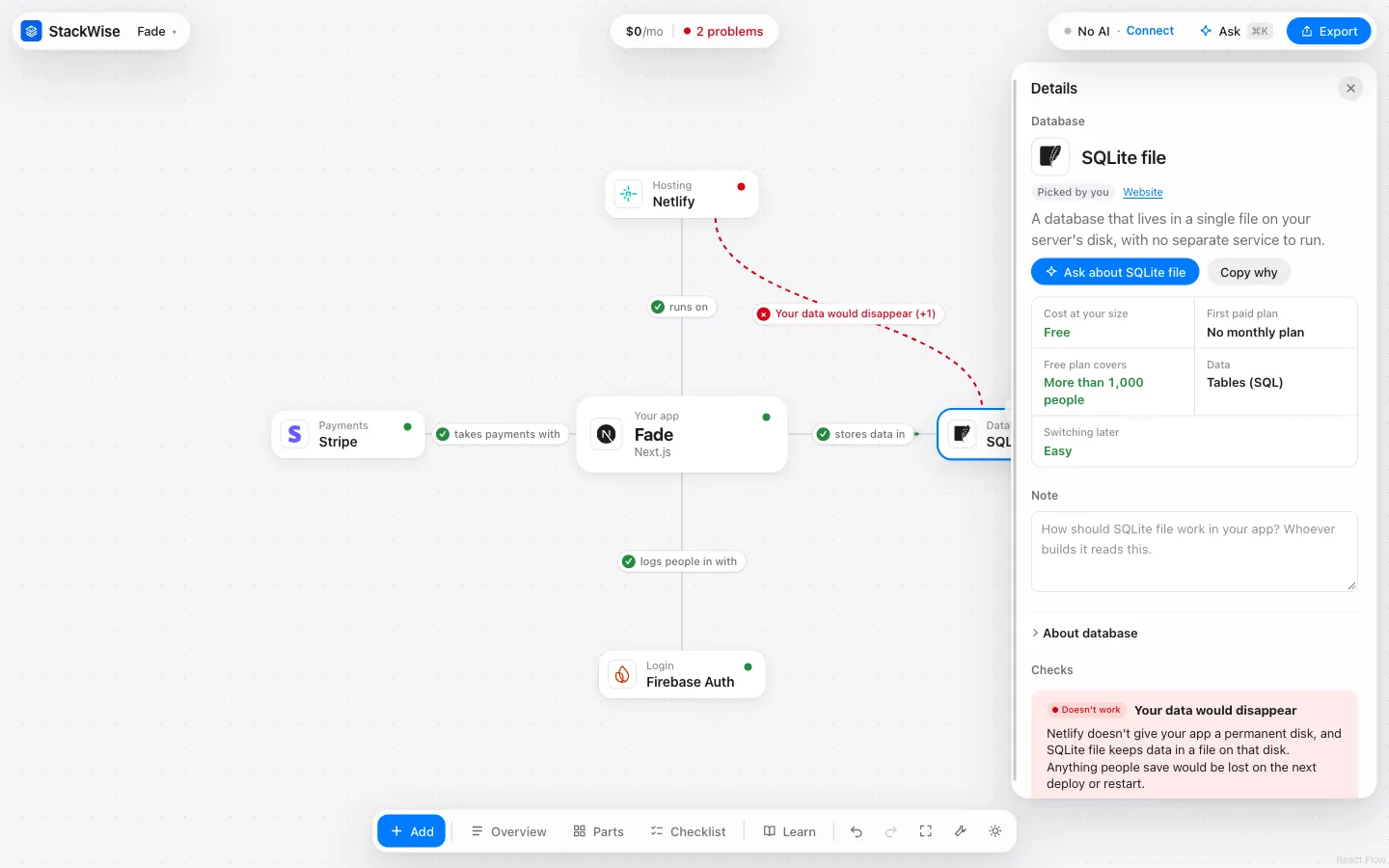
Three rules keep that honest:
- Unknown is never “works”. A missing fact makes a check unknown, and the canvas says so instead of drawing a check.
- Rules can only tighten. Product rules have no “works” in their schema at all, so no rule can turn a problem into a pass.
- AI output is checked against the input. When Claude reads your description, every answer it gives has to quote the words it came from, and a guess whose quote isn’t in what you typed is thrown away.
Claude still does real work: it reads the description, explains a plan in plain words, and answers questions about a part. It does all of that from a brief the engine computed first, so it can explain a verdict but never invent one.
What it catches
The payoff of rules over guesses is a specific list of mistakes StackWise stops before there is any code to rewrite. Among the 51 rules:
- Losing data: a file-based database on a host with no permanent disk.
- Leaking secrets: a payment, AI or email key that needs a server the plan doesn’t have, or a data API key that would ship to every visitor’s browser.
- Things that quietly stop: long jobs cut off by a host’s time limit, scheduled tasks that nothing runs, serverless code running out of database connections, a free app that falls asleep between visits.
- Money surprises: a host whose free plan forbids charging customers, downloads that cost past a free amount, AI that bills from the first request, and sales tax that is your job rather than your payment provider’s.
- Missing pieces: login emails with no email service to send them, email with no domain you own, an iPhone build that needs a Mac, session replays that can capture what people type.
Every problem comes with a fix, and the smaller notes say what to keep an eye on. On a canvas each of those is a right-click; once code depends on the choice, it is a rewrite. That difference is the whole argument for planning first.
Handing the plan to a coding agent
The rules matter most in what happens next. A coding agent building the app makes stack decisions constantly, and it makes them from memory.
StackWise is also an MCP server with 14 tools. An agent can check a stack, compare options for one part, get setup steps with the exact environment variable names, and change the plan, which goes through the same validation as the planner and shows up on the canvas with the agent’s reason, one Undo away. The plan comes back as a short text digest rather than a JSON dump, because an agent pays for every character it reads.
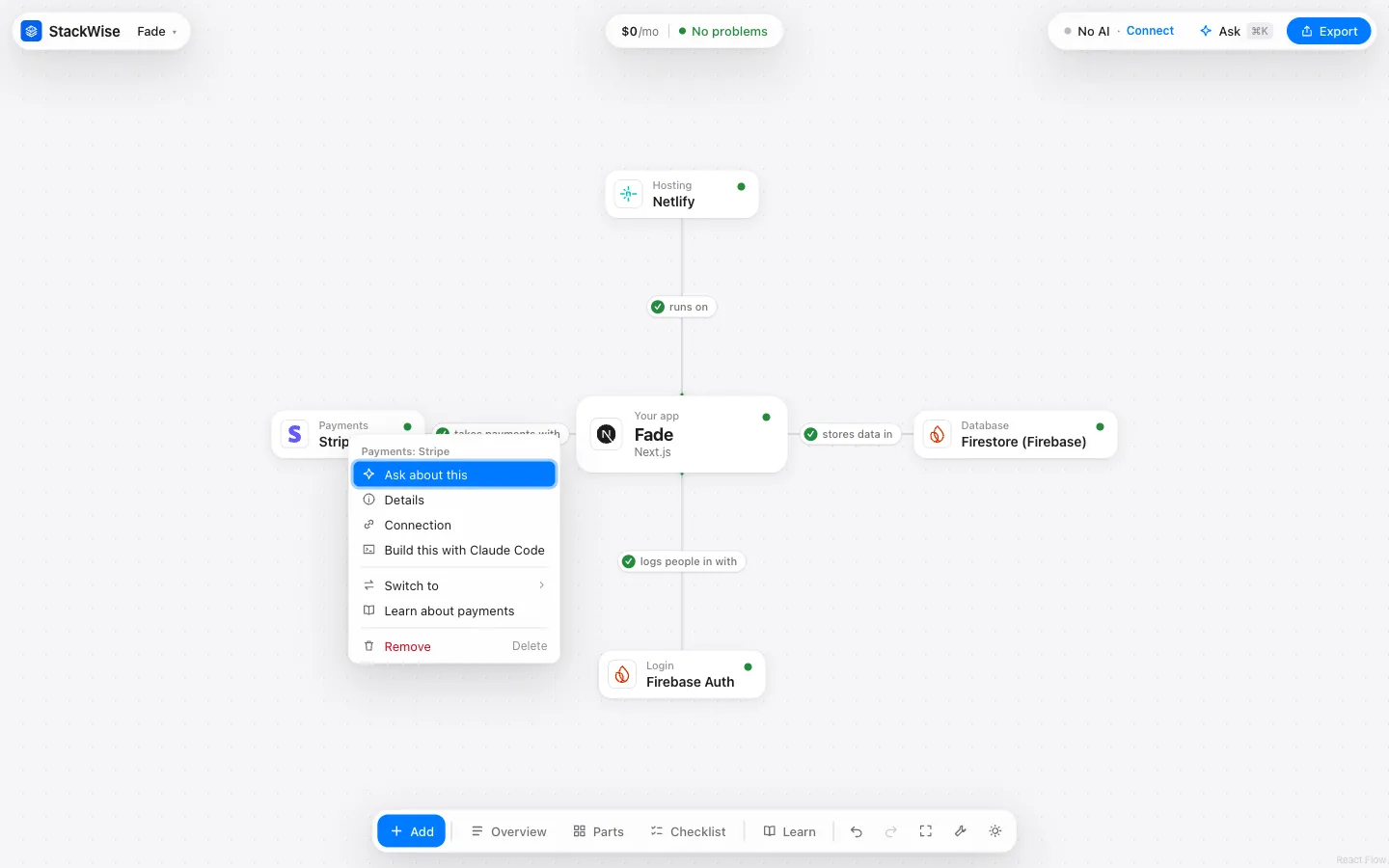
The canvas also becomes the build order. Every part, every second service and every line you drew between two parts turns into a task that only depends on the ones above it, with your note on it and what “done” means. Right-click a part and Build this with Claude Code sends that one task to the agent in your terminal, which answers back in the same panel. For builders that don’t speak MCP, the export carries the same plan as SPEC.md, SETUP.md, TASKS.md and a decision record with the reasoning for every part.
How it’s built
- Deterministic. The same answers give the same plan every time. Picking the best stack is a search over every combination of options, pruned with branch and bound and tested against brute force.
- Sourced. Every fact carries its source page and the date it was read, 557 facts from 301 pages, and a weekly job can reread the sources and propose changes for review.
- AI optional. Everything works without an API key. With one, Claude (or OpenAI, Gemini and others) reads descriptions and explains plans, always from the computed brief.
- Private by default. It runs on your own computer, answers only its own page and programs on the same machine, and never shows a key back once it’s saved.
- Tested. 321 tests cover the engine, the MCP server and the store, with a fake AI client so nothing in the suite calls an API.
Two things worth writing down
The server was reachable from the whole café. StackWise runs on your own computer and its API writes files, starts processes and saves AI keys. The development server was listening on every network interface, so anyone on the same Wi-Fi could have called it. It now binds to 127.0.0.1 only, refuses any Host header that isn’t a loopback name (which stops a website pointing its own domain at your machine), and only answers requests from its own page. Every one of those was checked against the running server, not just in a test.
A new part made the search take 25 seconds. Services that share one account (a Supabase plan covering both the database and login) were only counted once the search reached a complete stack, so the bound got loose, and four new parts pushed the plan with every feature switched on to 25 seconds. Counting shared accounts as the search goes put it back, and there is now a test that fails if that plan takes more than 1.5 seconds.
Where it is
Finished and public, and it runs on your own computer by design: pairing with an agent and writing project files need a machine that is yours.
Two things are open. All 557 facts are still drafts, and there is a review page that walks them one at a time, the facts behind the default plans first. And the evaluation harness is built but empty: I write those cases by hand, measuring how often the AI’s pre-fill beats keywords, and how often a plain model picks a stack that breaks a rule.